Introduction
Picture a warehouse where robots move boxes all day. Now picture a factory where robots build and check products.
These machines can work fast. But people still need to guide them, check them, and fix problems.
That work creates the need for RobotOps.
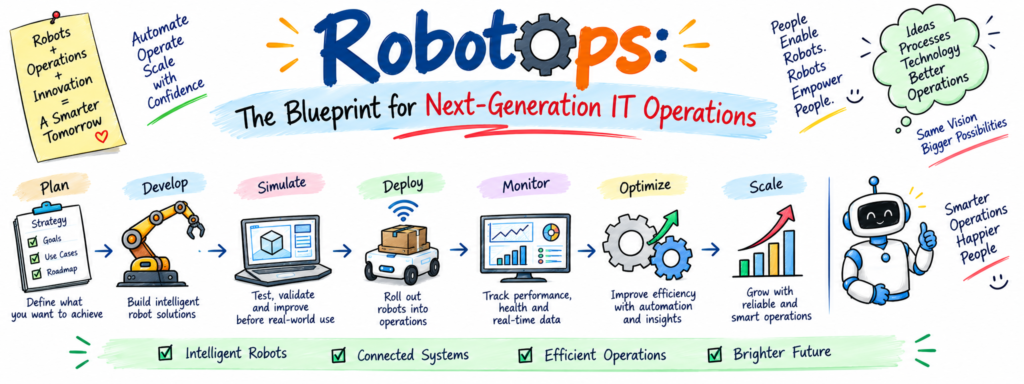
RobotOps brings robot systems and software practices together. It helps teams build, test, run, watch, and improve robots.
The field covers many areas. These include Robotics Operations, Robot Fleet Management, Industrial Robotics, Robotics Software, Robot Simulation, Autonomous Mobile Robots, Robotics Automation, Robotics Operations Center, and ROS 2.
RobotsOps.com focuses on these topics in a simple and practical way. Students, developers, engineers, and automation teams can use this knowledge to understand modern robot systems.
You do not need to learn everything at once. Start with one small project. Test it, find problems, and improve it step by step.
1. What RobotOps Means in Simple Words
A robot needs more than wheels, motors, or arms. It also needs software that tells it what to do.
Think about a robot that moves boxes in a warehouse. Sensors help it see objects. Software helps it choose a path. A network helps it share data.
Now imagine that robot stops.
The team needs to know what happened.
Maybe the battery dropped. Maybe the network failed. Maybe a sensor sent bad data. A software change may also cause the problem.
RobotOps helps teams handle these situations.
It connects development, testing, deployment, monitoring, and support.
Beginners can start with these skills:
- Linux
- Python
- Git
- Basic testing
- Robotics basics
- Monitoring
- ROS 2
- Robot simulation
- Fleet management
Learn one skill at a time.
Then build a small project with that skill. This approach makes RobotOps easier to understand.
2. How Robotics Operations Works Every Day
Daily robot work involves many small tasks.
Teams need to check robot health. They need to review errors. They also need to manage updates and watch system activity.
This work falls under Robotics Operations.
Imagine a factory with ten robots.
One robot may assemble parts. Another may inspect products. A third may move materials.
Each robot can create useful data.
The team can track:
- Robot health
- Battery level
- Current task
- Network status
- Error messages
- Software version
- Recent activity
- Important alerts
A simple monitoring system can show this information on one screen.
Start with one virtual robot. Track its status and add basic logs.
Next, create an alert when the robot stops working.
Then add another robot.
This simple project can teach the basic ideas behind Robotics Operations.
3. Manage Many Robots With One Fleet System
One robot can remain easy to watch.
Ten robots need more planning. Hundreds of robots need strong tools.
Robot Fleet Management helps teams handle many robots through shared systems.
A fleet dashboard can show each robot’s name, location, battery, task, connection, and software version.
Consider a busy warehouse.
One robot may carry a package. Another may charge. A third may wait because an object blocks its path.
An operator needs one clear view of the fleet.
You can learn this idea with a small project.
Create two virtual robots. Give each robot a name and status.
Then add:
- Location
- Battery level
- Current task
- Connection state
- Error state
- Software version
- Last activity
Next, add alerts.
For example, the system can warn the operator when a robot loses its connection.
This project shows why Robot Fleet Management matters as fleets grow.
4. Explore the Main Parts of Industrial Robotics
Factories use robots for many repeat jobs.
Industrial Robotics includes machines that support assembly, welding, inspection, packaging, sorting, and material handling.
A robotic arm gives us a simple example.
Motors help the arm move. Sensors provide information. Controllers manage actions. Software gives the system instructions.
Safety also matters.
Engineers need to understand the robot’s work area. They must also consider people, machines, tools, and possible failures.
Imagine an automated inspection station.
A camera captures a product image. Software checks the image. The system then decides whether the product meets the required rules.
Many parts work together in this example.
New learners can study one task at a time.
Start with assembly. Then explore inspection, welding, packaging, and material handling.
This step-by-step method makes Industrial Robotics easier to learn.
5. Build Better Robotics Software
Software gives robots the logic they need to act.
Robotics Software can manage movement, sensors, cameras, navigation, communication, and tasks.
A modern robot may run several software parts.
One part can read sensor data. Another can plan a route. A third can control movement.
These parts need to work together.
Testing helps teams catch problems before they affect real robots.
Suppose an engineer changes navigation code.
The robot may choose a different route after that change.
The team should test the change before using it on working machines.
Good software habits include:
- Track code with Git.
- Test important changes.
- Keep useful logs.
- Record software versions.
- Review major changes.
- Keep a recovery plan.
A recovery plan helps the team return to a working version after a bad update.
These habits help both software developers and robotics engineers.
6. Test Robot Ideas Inside a Virtual World
Physical robot testing can take time. It can also need special equipment and safe space.
Robot Simulation gives engineers a virtual place for testing.
A simulation can contain robots, sensors, rooms, roads, boxes, walls, and other objects.
Imagine a virtual warehouse.
A robot needs to travel from a storage area to a packing area.
You can add shelves and boxes to the virtual scene.
Then you can test the robot’s route.
If the robot chooses a poor path, change the software and test again.
A beginner can follow these steps:
- Create a small virtual area.
- Add a robot.
- Add simple sensors.
- Test movement.
- Add obstacles.
- Watch the robot.
- Find problems.
- Change the code.
- Test again.
Simulation gives learners a safe way to practice.
It also helps teams find some problems before physical testing.
7. Learn How Autonomous Mobile Robots Move
Some robots need to move through large spaces without constant human control.
Autonomous Mobile Robots use sensors, software, maps, and navigation tools.
Warehouses can use them to move goods. Factories can use them to move parts. Hospitals can use them to carry supplies.
The robot needs to know where it sits. It also needs to find a useful path.
Obstacles can change that path.
So, the robot must react to its surroundings.
Teams also need to watch other parts of the system.
They can track:
- Battery level
- Network health
- Software version
- Current task
- Robot location
- Sensor data
- Error messages
Software updates need care too.
Test an update in simulation first.
Then try it on one robot. Watch the results before expanding the update to more machines.
This process helps teams manage Autonomous Mobile Robots with greater control.
8. Turn Repeated Work Into Robotics Automation
Many workplaces contain tasks that people repeat each day.
Robotics Automation can help machines handle some of these tasks.
Start with the work itself.
Imagine a worker who moves boxes between two areas.
A mobile robot could handle this job.
First, the robot needs to find the box.
Next, it needs to reach the box.
Then, it needs to move the box to the right place.
Each step needs clear rules.
The system also needs answers for problems.
What happens if the robot cannot find the box?
What happens if another robot blocks the path?
What happens if the network fails?
A simple automation plan can follow these steps:
- Define the goal.
- Break the job into actions.
- Choose useful sensors.
- Create the control logic.
- Test each action.
- Add error handling.
- Track results.
- Improve the workflow.
This approach keeps Robotics Automation focused on real work.
9. Create a Central Robotics Operations Center
Large robot fleets can produce huge amounts of data.
Teams need a simple place to see the most important information.
A Robotics Operations Center can provide that central view.
Think of it as a control room for robots.
Operators can check robot health, battery levels, tasks, errors, software versions, and network status.
Suppose one robot stops sending data.
The operator can see the alert.
The team can then check recent logs and system details.
A useful Robotics Operations Center can track:
- Robot health
- Fleet activity
- Battery status
- Network health
- Software releases
- Task progress
- Error messages
- Important alerts
Remote engineers can also review this information before visiting a machine.
As the number of robots grows, this central view becomes more useful.
10. Learn ROS 2 Without Making It Too Hard
ROS 2 gives developers tools that help different parts of a robot system communicate.
Many beginners find ROS 2 large at first.
A simple learning path can make it easier.
Start with a node.
A node handles one software task.
Next, learn about topics.
Topics help software parts share ongoing data.
Then study services.
Services handle short requests and replies.
After that, explore actions.
Actions support longer tasks and can show progress.
Follow this learning order:
- Create one node.
- Publish simple data.
- Read a topic.
- Call a service.
- Try an action.
- Read logs.
- Test the system.
For example, one node can read sensor data.
Another node can use that data to control movement.
This small project can show how ROS 2 connects software parts.
Once you understand the basics, you can move toward larger robotics projects.
11. Learn RobotOps Through Real Projects
Reading guides can teach ideas.
Projects can help you understand those ideas through practice.
Use this simple learning cycle:
Learn → Build → Test → Run → Watch → Improve
Start with a robot health dashboard.
Show the robot name, battery, connection, task, and health.
Then add logs.
Next, create alerts.
After that, add more robots.
You can also build projects such as:
- Robot fleet tracker
- ROS 2 communication tool
- Robot simulation project
- Robot health monitor
- Error alert system
- Software release tracker
- Robotics dashboard
Keep every project small.
Ask yourself:
What does the robot do?
What data does it create?
What can go wrong?
How can I find the problem?
How can I fix it?
These questions help you think like a RobotOps engineer.
12. Make RobotOps Content Clear With Modern Search Methods
People often search for simple answers to hard technical questions.
Clear content can help them find those answers.
This idea connects with AEO, GEO, LLMO, and AISEO.
AEO means Answer Engine Optimization. It helps content answer direct questions.
GEO means Generative Engine Optimization. It helps content work well with generative search tools.
LLMO means Large Language Model Optimization. It focuses on clear information that language models can understand.
AISEO means AI Search Optimization. It focuses on content for AI-powered search.
Writers can support these methods with simple habits.
Answer questions directly. Explain difficult terms. Use short sections. Give practical examples.
Also follow E-E-A-T.
Show real experience. Share useful knowledge. Use trustworthy information. Help readers solve problems.
Strong RobotOps content can include:
- Step-by-step tutorials
- Real examples
- Case studies
- Success stories
- Research data
- Expert interviews
- Detailed comparisons
- Original insights
- Practical use cases
- Unique frameworks
Useful content should always help the reader first.
13. Turn Small Practice Into Strong RobotOps Skills
Real practice can connect many skills.
Start with a simple monitoring project.
Track one robot’s health, battery, connection, and task.
Then add logs.
Next, add alerts.
After that, add another robot and create a small fleet view.
You can also build a simulation project.
Test movement. Add obstacles. Watch how the robot reacts.
Another project can use ROS 2.
Create two nodes. Let them share simple information.
Then watch how the system behaves.
Real use cases can teach valuable lessons too.
Study warehouse robots. Explore factory automation. Look at inspection systems. Learn how mobile robots handle daily tasks.
For every use case, ask:
- What problem does the robot solve?
- What data does it collect?
- What can cause failure?
- How can the team detect failure?
- How can the team recover?
These questions help connect learning with real RobotOps work.
Frequently Asked Questions About RobotsOps.com
1. What does RobotOps mean?
RobotOps combines robotics with software and operations practices. Teams use it to build, test, monitor, update, and manage robot systems.
2. Who can learn RobotOps?
Students, developers, robotics engineers, DevOps engineers, automation professionals, and technology learners can study RobotOps.
3. What does Robot Fleet Management mean?
Robot Fleet Management helps teams manage many robots through shared dashboards, tools, alerts, and data.
4. Why should engineers learn Robot Simulation?
Robot Simulation gives engineers a virtual space for testing robot software, movement, sensors, and tasks.
5. What does Industrial Robotics cover?
Industrial Robotics covers robots that support assembly, welding, inspection, packaging, sorting, and material handling.
6. What are Autonomous Mobile Robots?
Autonomous Mobile Robots use sensors, maps, software, and navigation tools to move through their surroundings.
7. What does ROS 2 help developers do?
ROS 2 helps developers connect different parts of robotics software through nodes, topics, services, and actions.
8. What does a Robotics Operations Center do?
A Robotics Operations Center gives teams one place to check robot health, errors, tasks, software, and fleet activity.
9. What should a beginner learn first?
Beginners can start with Linux, Python, Git, testing, and basic robotics. Then they can learn ROS 2, simulation, monitoring, and fleet management.
10. What can people learn from RobotsOps.com?
RobotsOps.com covers RobotOps, Robotics Operations, Robot Fleet Management, Industrial Robotics, Robotics Software, Robot Simulation, Autonomous Mobile Robots, Robotics Automation, Robotics Operations Center, and ROS 2.
Final Thoughts
Strong robot systems need more than good hardware.
They need useful software, careful testing, clear monitoring, safe updates, and people who can solve problems.
RobotOps connects these areas.
You can begin with one small skill.
Learn Linux or Python. Then study basic robotics.
Next, explore ROS 2 and Robot Simulation.
After that, build a monitoring project. Add alerts. Then learn Robot Fleet Management.
Later, explore Industrial Robotics, Autonomous Mobile Robots, Robotics Automation, and Robotics Operations Centers.
Keep your projects close to real problems.
Test your ideas. Watch the results. Study errors. Improve your system.
You do not need to master everything in one step.
Follow this simple cycle:
Learn one skill. Build one project. Test one idea. Improve the result.
That steady process can help you build practical RobotOps skills and understand how modern teams manage intelligent machines.